> For the complete documentation index, see [llms.txt](https://docs.jaka.app/shopify/llms.txt). Markdown versions of documentation pages are available by appending `.md` to page URLs; this page is available as [Markdown](https://docs.jaka.app/shopify/~/revisions/rpY9mFDjQMRHRtjRdnC9/email-notifications/affiliate-emails.md).
# Affiliate emails
**Steps**
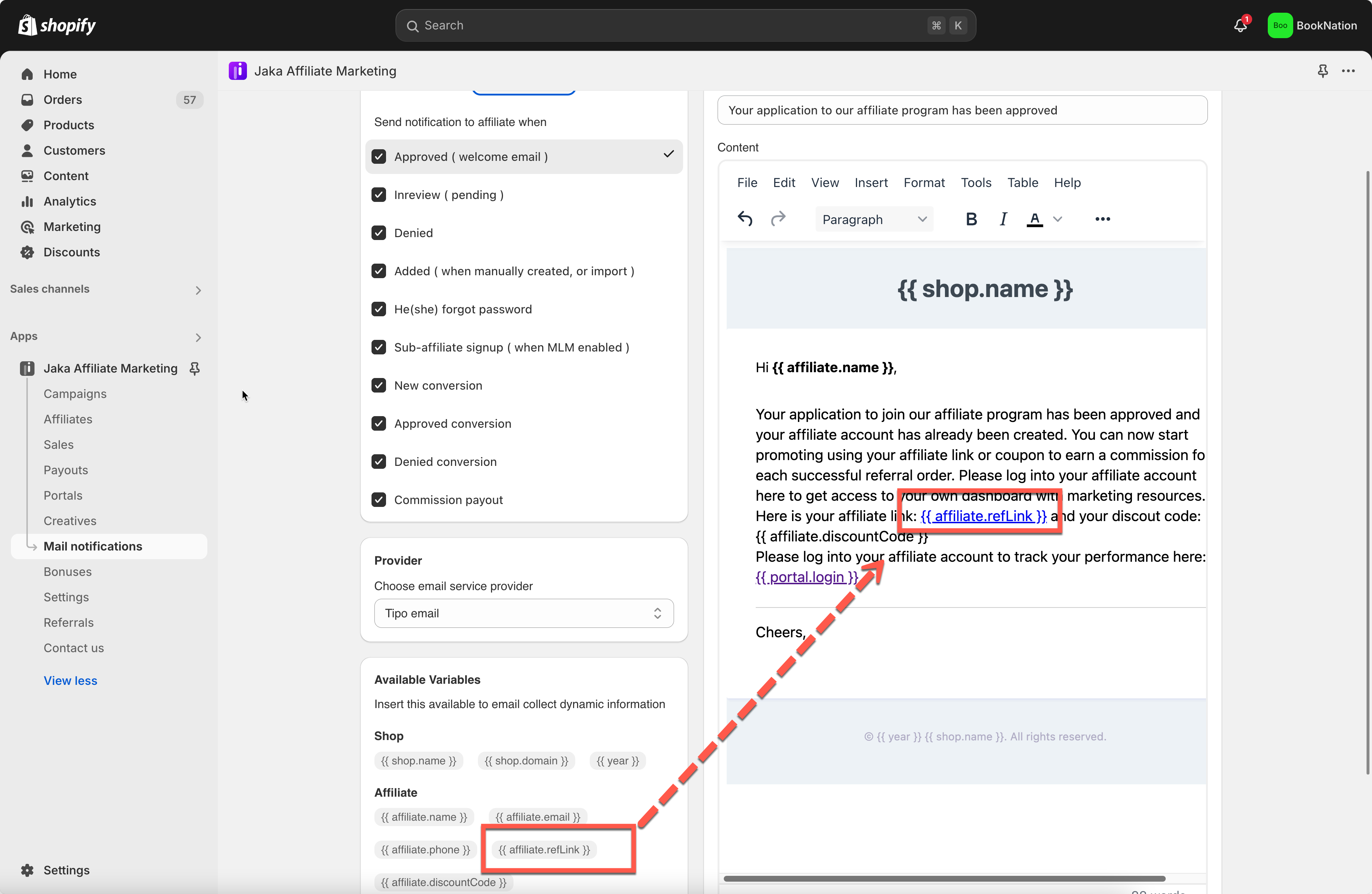
1. Open the app > click **Mail notifications** > click **Affiliates** tab
2. Tick on the checkbox of the email template to want to use
4. Edit the email content manually based on your need. Send dynamic email content by using variables. [Learn more](/shopify/~/revisions/rpY9mFDjQMRHRtjRdnC9/email-notifications/email-variables.md)
4. Click **Save** after making changes.
Email notifications will be sent from our email server () to your admin email addresses by default. You can also send emails from your own email address to admin email address by using your own SMTP email service. [Learn more](/shopify/~/revisions/rpY9mFDjQMRHRtjRdnC9/email-notifications/smtp-setup.md)
Below are the email template to affiliate the app provides
* Approved ( welcome email ): this email is sent to affiliates after affiliate account is approved in the app.
* Inreview ( pending ): this email is sent to affiliates after the register form is submitted. **Auto approved affiliate** option is disabled in the campaign detail.
* Denied: this email is sent to affiliates after affiliate account is not approved in the app.
* Added ( when manually created, or import ): this email is sent to affiliates after affiliate account is manually created by the admin in the app
* He(she) forgot password: this email is sent to affiliates after affiliates submit the forgot password form
* Sub-affiliate signup ( when MLM enabled ): this email is sent to affiliates after another affiliate register via invite link
* New conversion: this email is sent to affiliates after an order is created via affiliate link they share
* Approved conversion: this email is sent to affiliates after the sales (orders) are approved by the admin in the app
* Denied conversion: this email is sent to affiliates after the sales (orders) are rejected by the admin in the app
* Commission payout: this email is sent to affiliates after a payout of affiliate commissions is completed in the app