> For the complete documentation index, see [llms.txt](https://docs.jaka.app/shopify/llms.txt). Markdown versions of documentation pages are available by appending `.md` to page URLs; this page is available as [Markdown](https://docs.jaka.app/shopify/campaign-setup/multiple-level-marketing-mlm.md).
# Multiple-Level Marketing (MLM)
Multiple-Level Marketing (MLM) allows affiliates to earn **extra commissions** when they invite other affiliates into your program.
In short:
* One affiliate makes a sale
* That affiliate earns the main commission
* The affiliates **who invited them** earn **a percentage of that commission**
***
### ⚙️ Steps to set up
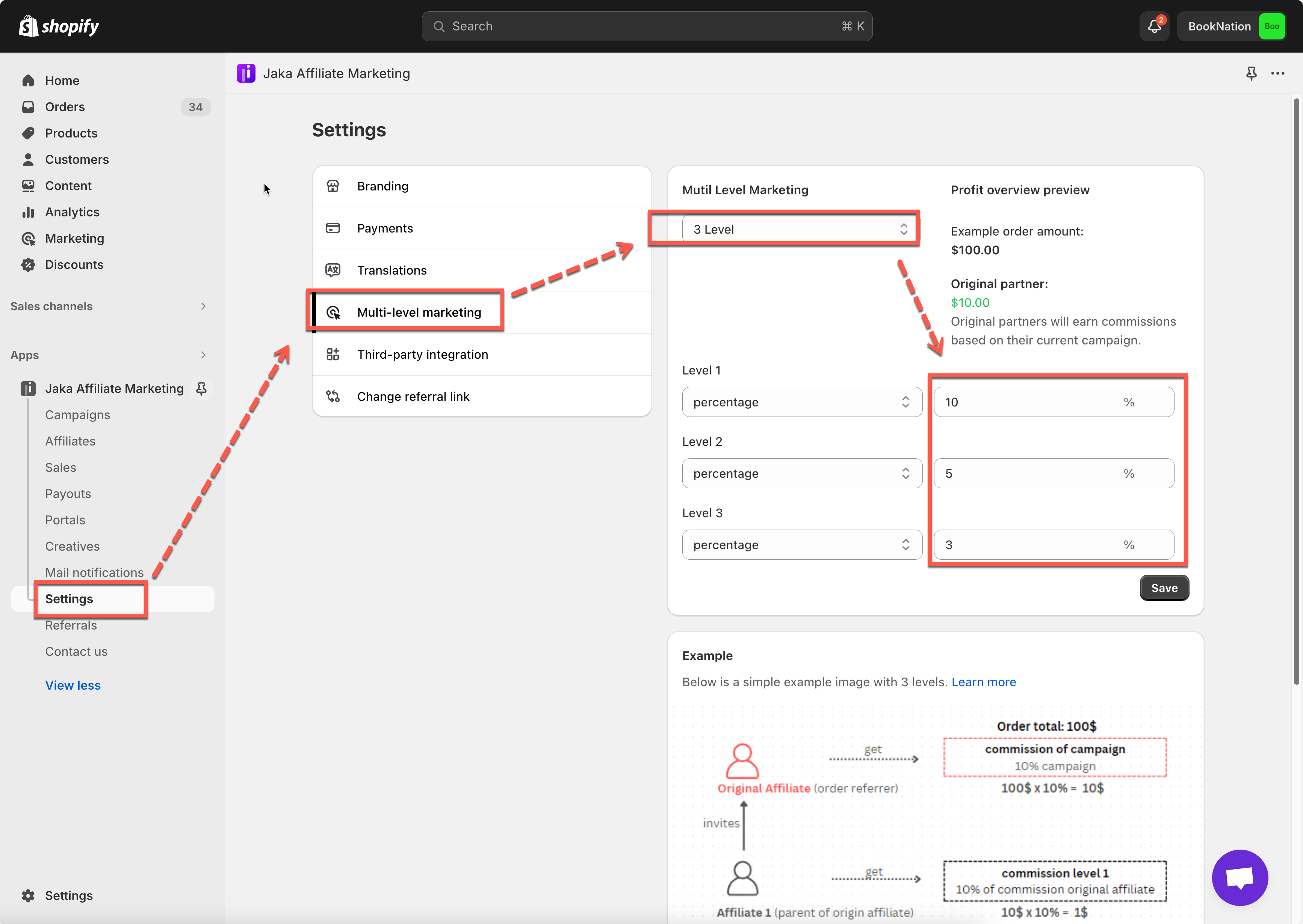
1. To activate the multi level marketing in the app, you need to create a **campaign** first.
2. In the app > click **Settings** > **Multi-level marketing** > select number of level you want to set up
3. Enter the commission amount of each level
4. Click **Save**
***
### ✅ How MLM Works
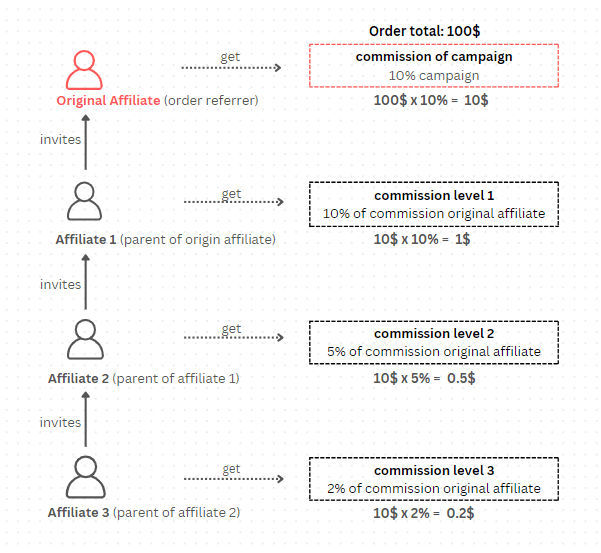
MLM commissions are not calculated from the order value directly.\
They are calculated as a percentage of the original affiliate’s commission.
Think of it like this:
> **Customer order → Original affiliate earns commission → Upline affiliates earn a share of that commission**
Each “level” is one step higher in the referral chain.
#### Key Roles in MLM
* **Original affiliate**\
The affiliate who directly refers the customer and generates the sale.
* **Level 1 affiliate**\
The person who invited the original affiliate.
* **Level 2 affiliate**\
The person who invited the Level 1 affiliate.
* **Level 3 affiliate**\
The person who invited the Level 2 affiliate.
Each level earns a smaller percentage, based on your MLM settings.
***
#### 📊 Example: 4-Level MLM Commission Breakdown
Let’s walk through a real example step by step.
**Affiliate structure**
You have 4 affiliates connected like this:
1. **Anna** – Original affiliate
* Directly registered to the campaign
* Refers the customer
2. **John** – Sub-affiliate (Level 1)
* Invited Anna
3. **Mike** – Sub-affiliate (Level 2)
* Invited John
4. **Jim** – Sub-affiliate (Level 3)
* Invited Mike
The Anna shares affiliate promote link with customers > customers purchase products via that link
**Order details**
* Order total: **$100**
* Campaign commission for original affiliate: **10%**
➡️ Anna earns:\
`$100 × 10% = $10`
#### MLM Commission Distribution
Now MLM commissions are calculated **from Anna’s $10 commission**, not from the $100 order.
Level 1 – John
* Commission rate: 10% of Anna’s commission
* Calculation:\
`$10 × 10% = $1`
➡️ John earns $1
***
Level 2 – Mike
* Commission rate: 5% of Anna’s commission
* Calculation:\
`$10 × 5% = $0.50`
➡️ Mike earns $0.50
***
Level 3 – Jim
* Commission rate: 2% of Anna’s commission
* Calculation:\
`$10 × 2% = $0.20`
➡️ Jim earns $0.20
Result:
| Affiliate | Level | Earns From | Commission |
| --------- | -------- | ----------------- | ---------- |
| Anna | Original | Order value | $10.00 |
| John | Level 1 | Anna’s commission | $1.00 |
| Mike | Level 2 | Anna’s commission | $0.50 |
| Jim | Level 3 | Anna’s commission | $0.20 |
***
#### **Still need support?**
If you still need help, please feel free to contact us at . We’ll be happy to assist you further.