> For the complete documentation index, see [llms.txt](https://docs.jaka.app/shopify/llms.txt). Markdown versions of documentation pages are available by appending `.md` to page URLs; this page is available as [Markdown](https://docs.jaka.app/shopify/campaign-setup/create-an-affiliate-campaign.md).
# Create an Affiliate Campaign
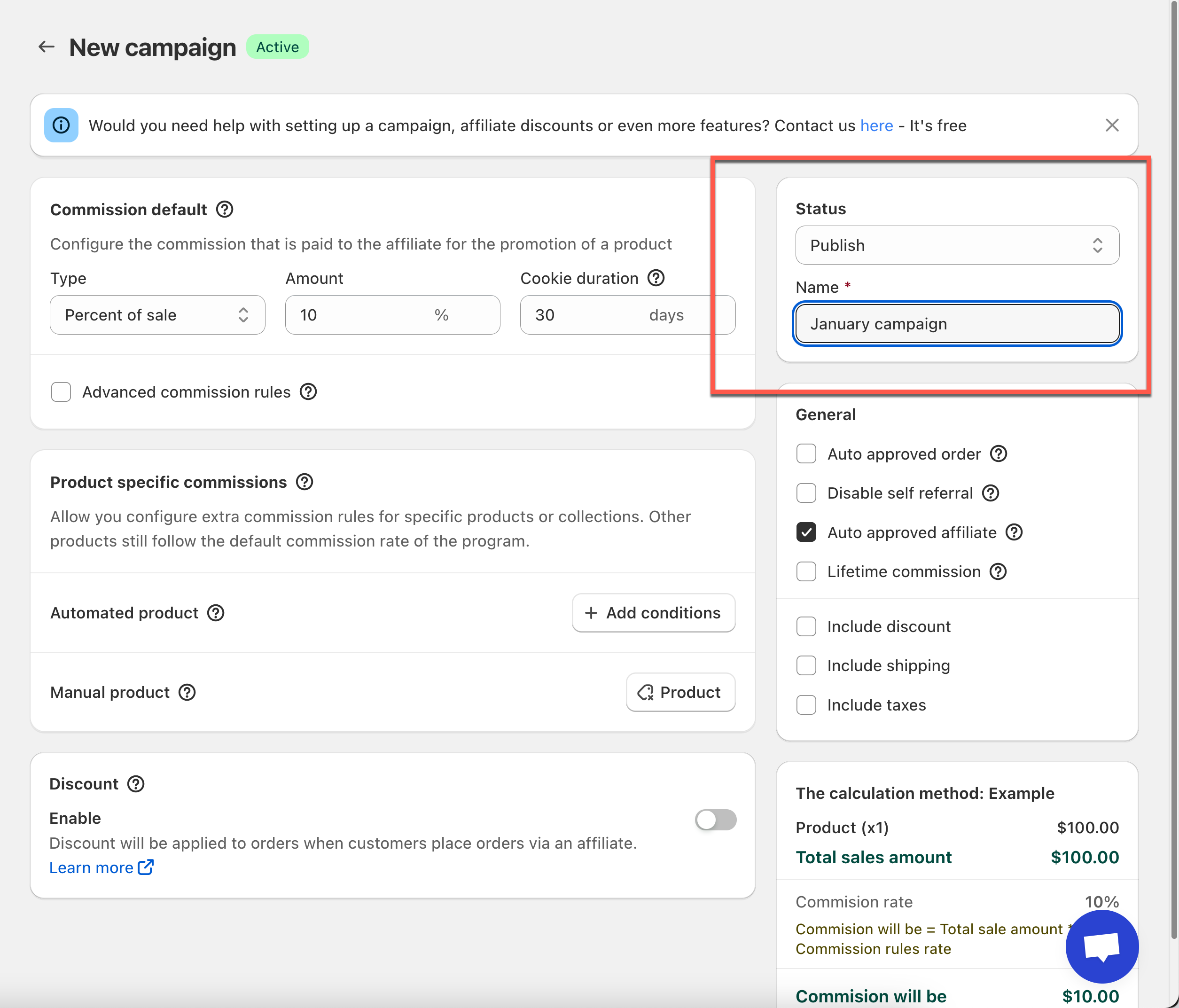
To start promoting your affiliate strategy, you need to have a campaign created in the app backend. Our system creates a default program for you with the commission type of Percent of Sales = 10%. You can edit that program or add a new program then set it as Default.
Note: there must be at least one campaign and it must be chosen to be the default program.
## ⚙️ General Steps to Create a Campaign
1. Open the app -> click **Campaign** -> Click **Add campaign** button
2. Set Campaign **Name** & **Status**
* **Campaign name**\
Used for internal reference (example: “Default Affiliate Program”)
* **Status**
* **Draft** – Campaign is not active
* **Publish** – Affiliates can join and earn commission
💡 You can change the status anytime.
3. Set the **Default Commission**
Choose how affiliates earn commission:
* **Percent of sale** (e.g. 10%)
* **Fixed amount** (e.g. $5 per order)
Set the **cookie duration**, which defines how long referrals are tracked.
4. Enable the **Discount** functions and set discount amount (optional)
Enable the discount function to offer a percentage or fixed amount off for affiliate-driven orders. You can apply it to specific collections and set usage limits.
**Example:**
* **Discount type:** Percentage
* **Amount:** 10%
* **Applies to:** "Winter Collection"
* **Limit:** One use per customer
This means affiliates can offer 10% off on selected products, and each customer can use it once. Let me know if you want help setting it up!
5. Click **Save** to create the campaign
6. Get the Affiliate registration link
Each campaign has its own **affiliate registration link**. Share this link to:
* Invite affiliates
* Add to your website
* Send via email or social media
Affiliates who sign up through this link join the campaign automatically.
Also, after creating a campaign, you can add the affiliate landing to the site to let visitors access the campaign and register/log in as affiliates. [Learn more](https://docs.jaka.app/shopify/getting-started-with-jaka/add-affiliate-landing-page#step-to-manage)
***
## **🧩** Explain Options & Rules (Commission Settings)
### 💰 Dedault commission Type & Amount
Jaka offers three commission types. Choose the one that best fits how you want to reward affiliates.
#### Percent of Sale
The affiliate earns a percentage of the order value.
* Commission is calculated based on the product total
* Shipping, tax, and extra fees are not included (unless you enable them)
**Example:**
* Order value: $100
* Commission rate: 10%
* Affiliate commission: **$10**
***
#### Flat Amount (Per Order)
The affiliate earns a fixed amount for each order, no matter the order size.
* Commission is paid once per order
* Shipping and tax are not included (unless you enable them)
**Example:**
* Flat commission: $5
* Order value: $50 or $200
* Affiliate commission: **$5**
***
#### Flat Rate per Item
The affiliate earns a fixed amount for each product item sold.
* Commission is calculated per unit
* Shipping and tax are not included
**Example:**
* Flat rate per item: $3
* Quantity purchased: 4 items
* Affiliate commission: **$12**
***
### 🍪 Cookie Duration
Jaka Affiliate Marketing provides you with the option to set the cookie duration. Cookie duration defines how long a referral is valid.
On the **Campaign** panel -> in **Commission Rules** section -> enter the number of days in **Cookie Duration** to set the expiration duration of the affiliate tracking cookie.
Example: `30 days`
* If a customer buys within 30 days after clicking an affiliate link, the affiliate earns commission
* After the cookie expires, no commission is recorded
### 💰 How Commission Is Calculated
You can control what is included in commission calculations:
* ✅ Include discount
* ✅ Include shipping
* ✅ Include taxes
#### Example:
* Product price: $100
* Discount: $10
* Commission rate: 15%
If **discount is included**:\
Commission = 15% × $90 = **$13.50**
The calculation preview panel shows this clearly.
Note: it will be the discount total which the order has contains the discount of store, affiliate discount if applicable, ect...
***
### ✅ Auto vs Manual Affiliate Approval
* **Auto-approved affiliate**\
Affiliates can start promoting immediately after signup
* **Manual approval**\
You review and approve affiliates before they can promote
### ✅ **Auto Approved Order**
After the orders are created from affiliate link, the sales are created in the app. Each order created thanks to any affiliate will be stored the order information in **Sales** tab.
* If the **Auto Approved Order** is enabled, the sale is creates and commission for affiliate is created immediately in the app.
* If the **Auto Approved Order** is not enabled, you need to manually check each sale in the Sales tab and accept them.
***
### ♾️ **Lifetime commission**
When **Lifetime Commission** is enabled, an affiliate earns commission **every time a referred customer makes a purchase in the future** — not just the first order.
Once a customer is referred:
* The customer is permanently linked to the affiliate
* Future orders are still counted even if no affiliate link is used
* Tracking is based on the customer’s email, not cookies
#### 📌 How It Works
1. An affiliate shares their referral link
2. A customer makes their **first purchase** using that link
3. The customer is now **assigned to the affiliate**
4. Every future order from the same customer earns commission for that affiliate
#### Example
* Lifetime commission rate: **30%**
* Affiliate A refers a customer named **Laura**
**Month 1**
* Laura orders $50 using the affiliate link
* Affiliate A earns **$15**
**Month 2**
* Laura orders $50 (no affiliate link)
* Affiliate A still earns **$15**
**Month 3**
* Laura orders $50 again
* Affiliate A earns **$15**
✅ The affiliate continues earning commission **for every future order** from Laura.
***
### 💰 Advanced commissions
Advanced commission rule allows you to override the default commission with Order total amount, discount code and customer name. [Learn more](https://docs.jaka.app/shopify/campaign-setup/advanced-commissions)
### 💰 Product-Specific Commissions
Product specific commissions feature allows you configure extra commission rules for specific products or collections. Other products still follow the default commission rate of the program.
[Learn more](https://docs.tipo.io/overview/general-steps-to-connect-stores#a-tutorial-video)
***
### 🚫 Disable self referral
When **Disable Self-Referral** is enabled, affiliates cannot earn commission on their own purchases.
If an affiliate uses their own affiliate link and places an order:
* The order will not be tracked
* No commission will be generated
* The affiliate’s email is used to detect self-referrals
#### Example
* Affiliate A registers with the email: `affiliate@email.com`
* Affiliate A clicks their own affiliate link
* Affiliate A places an order for **$100**
❌ No commission is earned\
❌ The order is ignored by Jaka Affiliate Marketing
***
### ▶️ Tutorial video
***
{% embed url="" %}
\
**Still need support?**
If you still need help, please feel free to contact us at . We’ll be happy to assist you further.