> For the complete documentation index, see [llms.txt](https://docs.jaka.app/shopify/llms.txt). Markdown versions of documentation pages are available by appending `.md` to page URLs; this page is available as [Markdown](https://docs.jaka.app/shopify/campaign-setup/auto-tier-commission.md).
# Auto tier Commission
### ℹ️ What Is Auto Tier Commission?
**Auto Tier Commission** automatically increases an affiliate’s commission when they reach specific performance milestones.
Instead of manually moving affiliates to a new campaign, Jaka does this for you, based on rules you define (for example, total commission earned).
This is perfect for:
* Rewarding top-performing affiliates
* Encouraging affiliates to sell more
* Running long-term incentive programs
***
### ✅ How Auto Tier Commission Works
**Auto Tier** works like a ladder:
1. An affiliate starts at a base tier (default campaign)
2. When they meet a condition (e.g. total commission ≥ $1,000)
3. They are automatically upgraded to a higher tier (moved to a new campaign with higher commission rate)
4. Higher tier = higher commission rate
The system keeps checking affiliate performance and moves them up the tiers automatically.
***
### ⚙️ General Steps to Set Up Auto Tier Commission
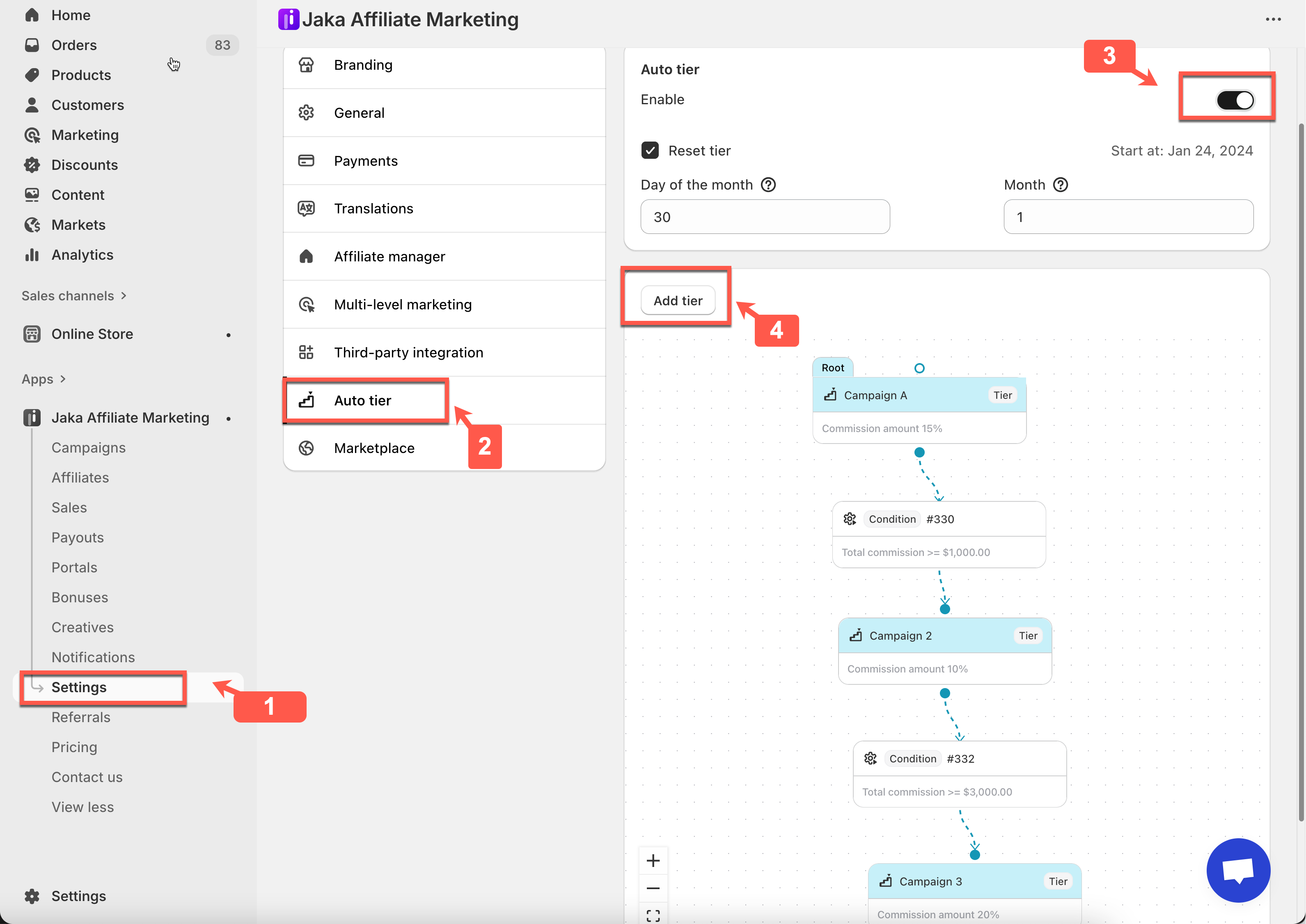
1. Open the app > click **Settings** > **Auto tier**
2. Enable **Auto Tier:** toggle **Active** to turn on Auto Tier Commission.
3. Create Tier 1 (Root Tier)
Click **Add tier** > select **Campaign 1** (commission 5%). This becomes **Tier 1 (Root tier)**
4. Create Tier 2 (Higher Commission)
Click **Add tier** again > select **Campaign 2 -**Commission: **10%.** This becomes **Tier 2**
4\. Link the tier 2 to tier 1 and set the condition
* Connect **Tier 2** to **Tier 1**
* Set the condition: `Total commission ≥ $1,000`
This rule means affiliates must earn at least **$1,000 in total commission** to move up.
\=> **Affiliate A** drives more sales and earn more commissions (total is 1500$), crossing into **Tier 2 (10% commission)** he will be automatically moved from campaign 1 to campaign 2
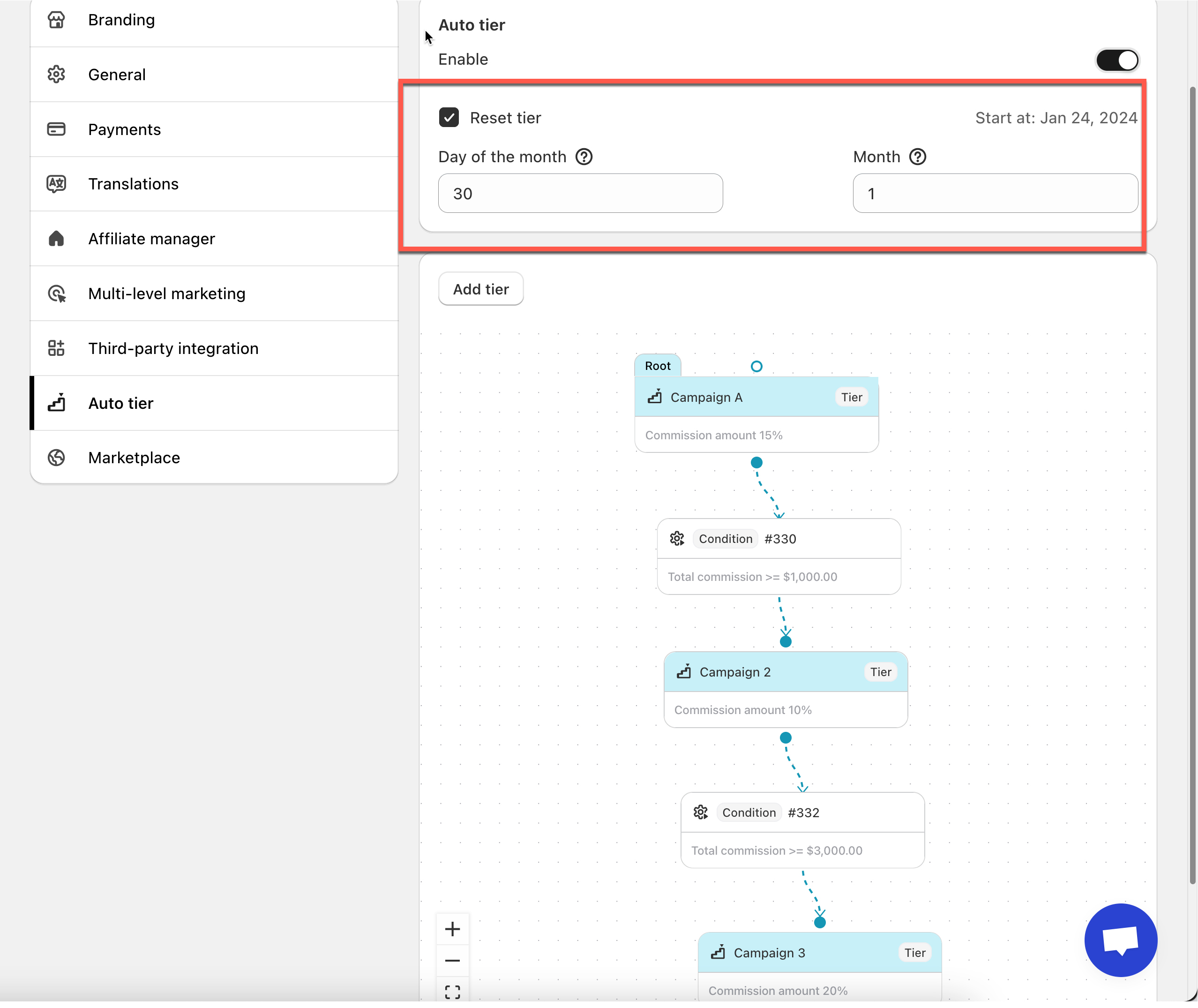
5. Set the reset tier rule
* If you set **Day of the month = 1**\
→ Tiers reset on the first day of the month
* If you set **Day of the month = 30**\
→ Tiers reset on the 30th day
6. Save the app settings
6\. Click **Save**
***
### 🛠️ Reset tier
The **Reset Tier** option controls when affiliates are moved back to the starting tier after a certain time period. This helps you run monthly, quarterly, or custom performance-based tier programs.
When enabled, affiliates must re-earn their commission level again in the next period.
Configure:
* **Day of the month**
* **Month**
#### Day of the Month
This setting defines which day the tier reset happens.
How it works:
* If you set **Day of the month = 1**\
→ Tiers reset on the **first day of the month**
* If you set **Day of the month = 30**\
→ Tiers reset on the **30th day**
* If the selected day **does not exist** (e.g. 31 in February)\
→ The system resets on the **last day of that month**
> 💡 **Tip**\
> Use Day = **1** if you want a clean, monthly performance cycle.
***
#### Month (Reset Frequency)
This setting defines how often the reset happens, in months.
How it works:
* **Month = 1** → Reset **every month**
* **Month = 2** → Reset **every 2 months**
* **Month = 3** → Reset **quarterly**
* **Month = 12** → Reset **yearly**
***
#### Example: Monthly Tier Reset
Setup:
* Day of the month: **1**
* Month: **1**
What happens: On the 1st day of every month, all affiliates:
* Are moved back to the **Root / Tier 1 campaign**
* Must earn commissions again to unlock higher tiers
#### Example: Performance-Based Auto Tier With Reset
* Tier 1 → Campaign A (5%)
* Tier 2 → Campaign B (10%) when total commission ≥ $1,000
* Tier 3 → Campaign C (20%) when total commission ≥ $3,000
Affiliate A
* Earns $1,500 in January → moves to **Tier 2**
* Earns $3,200 → moves to **Tier 3**
✅ If Reset Tier is ON
* On the reset date, Affiliate A goes back to **Tier 1**
* Must re-qualify again next cycle
❌ If Reset Tier is OFF
* Affiliate A stays at Tier 3 permanently
***
### 🔄 Tutorial video
{% embed url="" %}
***
#### **Still need support?**
If you still need help, please feel free to contact us at . We’ll be happy to assist you further.